Lucid × Slack · Collaboration tools
Rethinking team setup to drive adoption
Accelerating team setup by bringing existing Slack groups directly into Lucid.
Faster team setup
5–10 minunder 1 min
More Lucid teams
15,47016,240
Positive feedback
Found the integration valuable
- Company
- Lucid Software
- My role
- Solo UX designer
- Timeline
- May–August 2024
- Team
- 1 product manager · 1 researcher · 4 engineers
- My Contribution
- I defined use cases, planned research, explored three Canvas presentations, and iterated on the design. When API constraints undermined document retrieval, I helped redirect the integration toward reusing Slack channel membership.
Design snapshot
AI-guided team creation
Explore a recommended group, review its members, and create a team.
Import from Slack
Choose an existing Slack channel, adjust its members, and start working in Lucid.
Connect the work between tools
Teams discussed their work in Slack and created diagrams and whiteboards in Lucid. But connecting the tools did not remove the preparation between them: people still had to find the right document or add the same teammates again before they could collaborate.
Lucid wanted the integration to turn connected accounts into active collaborators. As the sole designer, I worked with a product manager, a researcher, and four engineers to find where it could remove that repeated work. We started with document retrieval.
Where the team talks
Conversations, shared links, and an existing group.
Where work takes shape
Diagrams, whiteboards, and a team to collaborate with.
Finding a shared document
Who we designed for
People who shared and opened Lucidchart or Lucidspark documents in Slack at least three times a week over the previous two months.

Survey feedback revealed why returning to a document took work: file names were hard to recognize, links became buried in conversations, and documents were spread across channels. Sharing a link was easy; finding it again was the problem.
User journey
A sprint review is about to begin. A teammate needs to find the Lucid board their PM shared in Slack.
-
01 · Share
PM shares the board
The sprint-review board is posted in Slack.
Excited to begin -
02 · Search
Search in Slack
Search results do not surface the right board.
Frustrated -
03 · Dig
Dig through messages
The document is buried in the conversation.
More frustrated -
04 · Open
Open in Lucid
The link takes the teammate to the board.
Ready to work
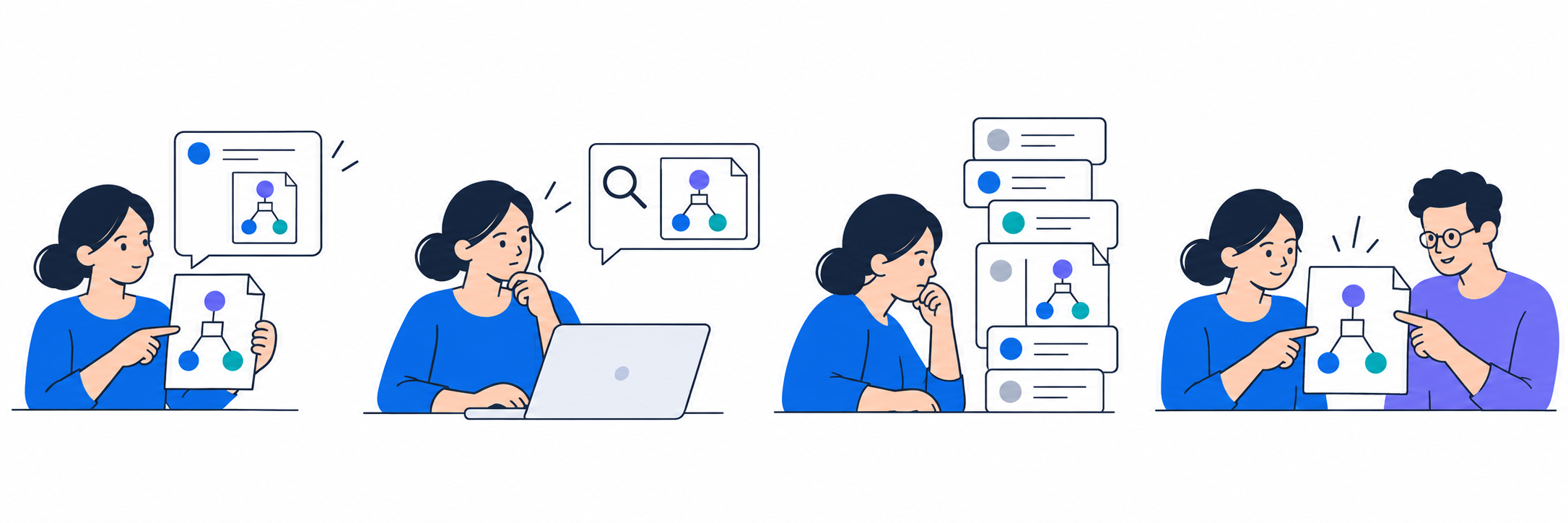
The friction sits between sharing and opening. People know the board exists, but finding it again interrupts the work.
The journey pointed to a first opportunity: keep shared documents together, so users would not have to retrace the conversation each time.
A shared place for documents
Slack Canvas already gave each channel a persistent place for resources, but users had to add Lucid links manually. I explored a collection that would pull in documents shared in the channel automatically.
If shared documents stayed together, people could return to one place instead of searching through messages. The collection would also need to help them recognize the right document.
Before: add each document manually
Someone had to copy a shared Lucid link into Canvas to keep it available.
Proposed: collect shared documents automatically
The integration would add Lucid documents from the channel to a shared collection.
How the flow would work
- 01Share in Slack
A teammate posts a Lucid document.
- 02Collect in Canvas
The shared link joins the collection.
- 03Recognize the document
Use its details to identify the right one.
- 04Continue the work
Open it in Lucid or revisit the conversation.
Three ways to find it
A collection could remove the search through messages, but it still needed to help users tell documents apart. I explored three ways to recognize a shared document: its title, the person who shared it, or when it appeared.
Users needed different clues
The concept comparison gathered 44 written responses about which presentation would save time and why. The feedback suggested that users did not all look for the same clue: some valued the information in the card, while others depended on when the document had been shared.
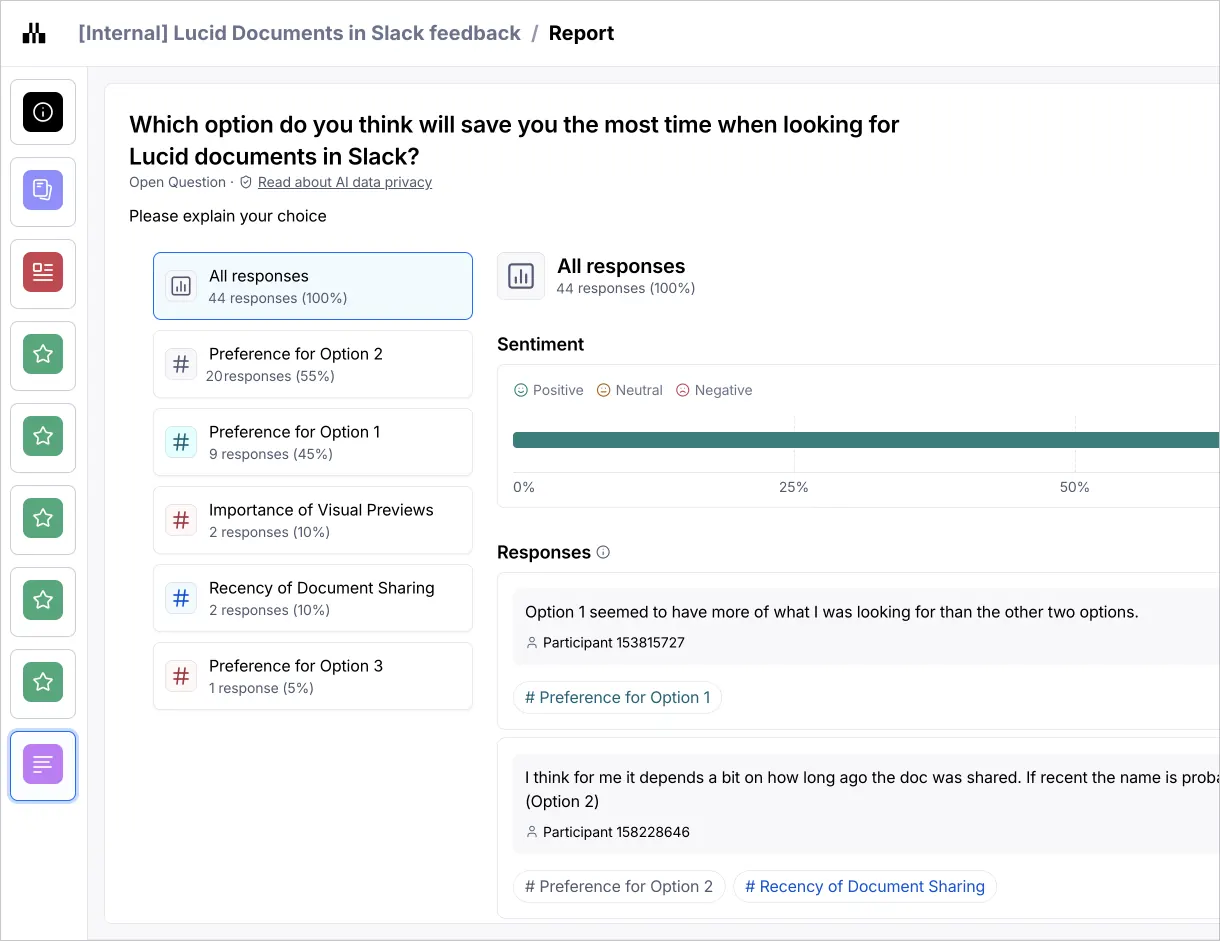
Option 1 seemed to have more of what I was looking for than the other two options.
I think for me it depends a bit on how long ago the doc was shared.
Combine the clues in one card
I kept the document title and brought a larger preview, sharer, date, and source conversation together. That allowed people to use whichever clue they remembered, instead of making one cue carry the entire search.
The larger card showed fewer documents at once. I made that tradeoff to help users distinguish the right document before opening it.
From collection to conversation
Open the channel’s collection, recognize the board, and return to the message where it was shared.
Pivot: from documents to teams
The iteration depended on visual context: users needed enough of the document, its sharer, and its history to recognize it. When we tried the concept in the development environment, Slack’s Canvas API could not deliver the presentation that task required.
Even after choosing a Canvas, users would still struggle to identify the right document. We paused the Canvas direction because collecting links alone would not solve the retrieval problem.
of users wanted Slack and Lucid Teams to stay in sync.
This separate feedback gave us a reason to explore team setup. People already had their group in Slack, but had to add its members again in Lucid. I proposed the shift and reframed the question with our researcher: could the integration carry that existing group into Lucid?
Stop rebuilding the same group
Who we designed for
Slack-enabled users who had tried to create a Lucid team within the previous three months. They already knew who they worked with; adding those people again was the repeated work.

When adding members to my Lucid team, I want to easily sync them from a Slack channel with the same list.
If people could import a channel’s members and adjust the list before creating a Lucid team, they could begin collaborating without entering the same people one by one.
Repeat the roster
Reuse the group
Review the roster together
Adjust who belongs in this Lucid team, then create it.
Two ways to start a team
Some users already knew which Slack channel represented their team. Others worked across channels and needed help identifying a useful group. These two situations called for different starting points.
Working with the Teams and AI/ML teams, I explored a direct channel import and recommendations based on activity, shared documents, and connections. In both paths, users would review the people before creating a team.

Help people find a group
For users who did not have a channel in mind, recommendations could offer a starting point. I made the supporting context and channel members visible so the user could judge the suggestion before adding it.
4 · From suggestion to setup
The sequence brings these choices together: inspect why a channel is suggested, review its members, then create the team from the selected group.
Bring the existing group
For users who knew their channel, a direct import avoided an unnecessary recommendation step. I compared showing every imported person in the field with keeping the channel together and reviewing its members separately.
Import once, review before creating
The final member-import flow starts with a known Slack channel. A channel token keeps the group recognizable; a separate member list lets users remove people who do not belong in this Lucid team. That preserves the speed of importing a group without assuming the two teams must be identical.
We scoped this flow to a one-time import. Keeping later membership changes aligned would require another set of decisions, which became part of the roadmap.
Less setup, more teams
Faster team setup
5–10 minunder 1 min
More Lucid teams
15,47016,240
Positive feedback
Found the integration valuable
The project compared manual setup with AI-assisted Slack sync, tracking setup time, team creation, and satisfaction. These results supported reducing the work of getting a team ready.
The work also strengthened the Slack partnership and stakeholder support for the integration’s next stages.
Roadmap: stay in sync
One-time import reduced the initial setup. The longer-term vision was to keep the people and their shared work connected as teams changed.
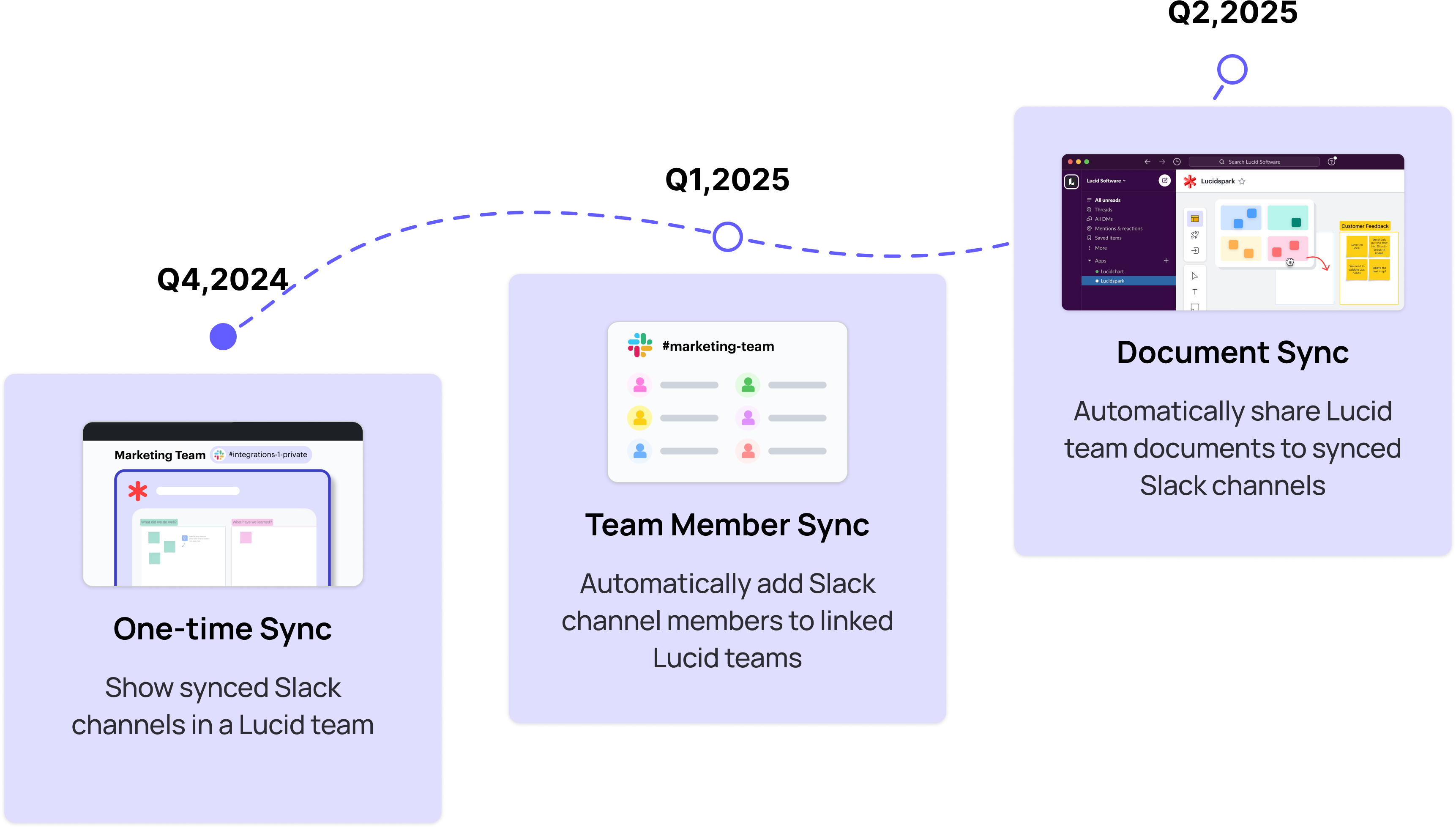
Future state

Slack channel
The existing group

Lucid team
The shared workspace
Membership updates and document sharing would need clear permissions and user control before expanding beyond one-time setup.
Help people get started
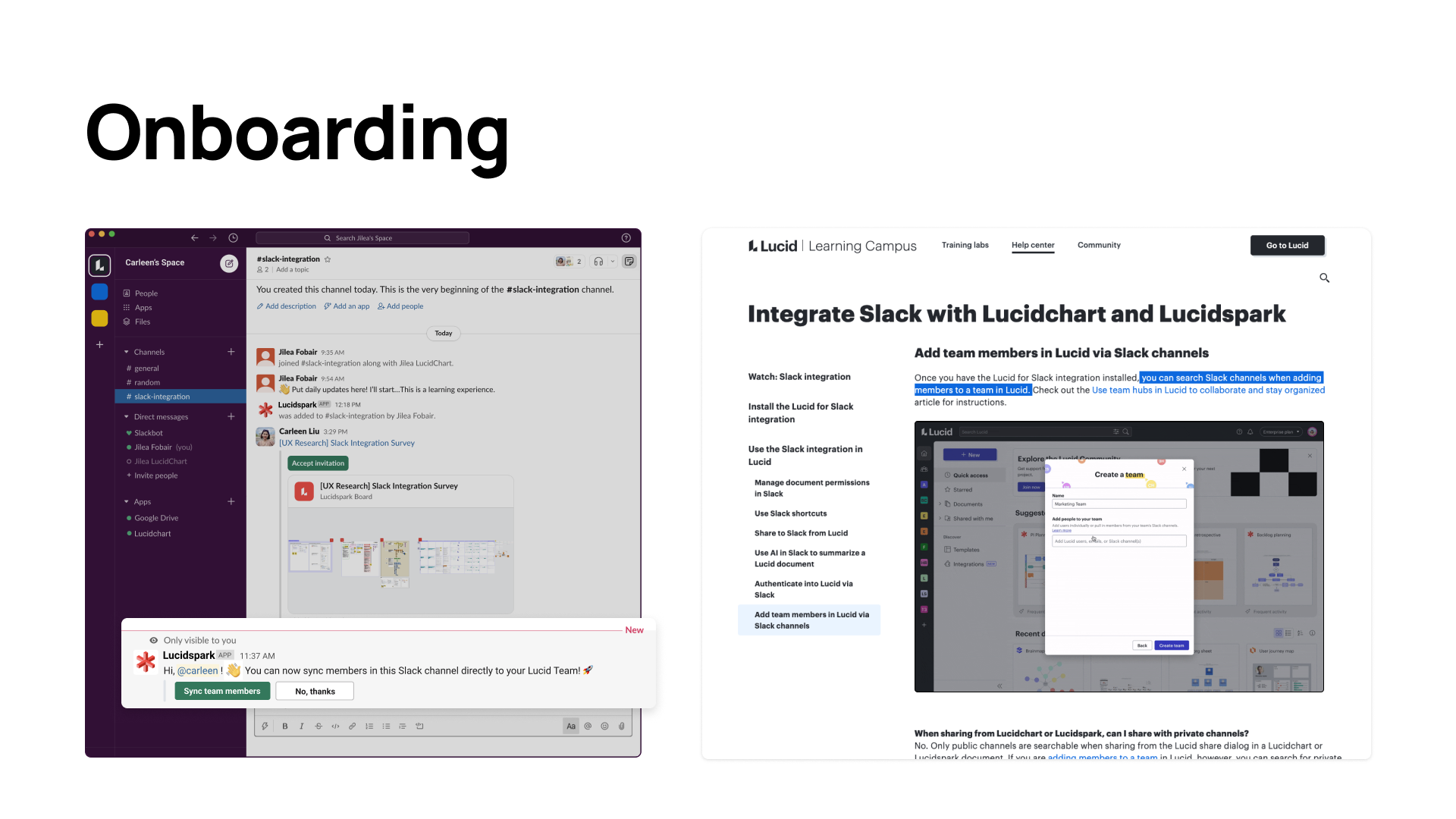
With the learning team, I worked on the Slack entry point and onboarding documentation so people could discover the integration and understand how to start.
What I learned
Test the essential task against real constraints early. Our Canvas concept depended on visual recognition. Next time, I would work with engineering on an API-backed prototype and test whether people could find a real shared document before refining the presentation.
Measure what happens after setup. The pivot made team creation faster, but that does not tell us whether teams kept collaborating. I would track the first shared activity and return usage alongside setup completion. The original document-finding problem would remain visible as a separate need.